Integrations
The Integration Playbook for Modern Live Chat
How Connecting Your Live Chat to the Tools You Already Love Changes Everything
Why Integrations Are No Longer Optional
Live chat used to be such a small thing. A widget in the corner, a few questions answered, done. Nobody expected much of it. The trouble is that the world your customers move through has shifted under everyone's feet, and what they expect now is a different animal entirely.
Think about how people actually behave in 2026. They've messaged you on WhatsApp before they ever load your homepage. They assume you already know what they bought last month the second they start typing. They want the ticket to just exist, not to fill in three forms to create it. Some of them want the AI assistant on their phone to ask you questions on their behalf and get a real answer back.
None of that is far-fetched, it's just where things are now. And it's the reason ICTDesk.net isn't only a live chat tool. It's an integration hub, a way to wire your conversations into the platforms your business already runs on.
Honestly, integration stopped being a feature a while ago. Left on its own a chat tool is just an island. Connected, it turns into the place your whole customer operation actually comes together.
So this is the full tour: every integration category ICTDesk supports, from CRMs and helpdesks through to AI language models and the newer Model Context Protocol. For each one I'll cover what it does, the platforms it talks to, how a user hooks up their own account, and why any of it matters once you're back at your desk on a normal Tuesday.
Just signed up and running a small shop? Evaluating ICTDesk for a company-wide rollout? Either way, treat this as your reference.
How ICTDesk Integrations Work
One thing to grasp before we get into specific platforms, because it shapes everything else. ICTDesk doesn't sit in the middle holding your data. Each business that buys a package connects its own third-party accounts, straight from its own workspace.
Say you want your chats flowing into HubSpot. You click "Connect HubSpot" in your dashboard, HubSpot's own login screen takes over, you approve what it can access, and the OAuth token comes back encrypted and tied to your workspace alone. Nobody else on the platform can see it or touch it.
That distinction carries a lot of weight. Your customer data stays yours; ICTDesk is the connector, never the owner. Every call out to HubSpot, Shopify, or OpenAI runs on your credentials, in your name, inside the permissions you granted and nothing wider.
The Four Ways Users Connect
| Auth Method | Used By | How It Works | Security Model |
|---|---|---|---|
| OAuth 2.0 | HubSpot, Salesforce, Shopify, Google | User redirected to provider login, approves scope, token returned | Token encrypted per workspace, refresh auto-managed |
| API Key / Token | OpenAI, Stripe, Mailchimp, Zendesk | User pastes their own API key into ICTDesk settings | Keys stored in encrypted vault, never exposed in UI |
| Webhook / SDK | WhatsApp, Zapier, n8n, Make | ICTDesk generates unique webhook URL per user workspace | Webhook secret validated on every incoming request |
| MCP Server | Claude, ChatGPT, Copilot, Cursor | User’s AI client connects to ICTDesk MCP server endpoint | Bearer token + per-user workspace scoping |
With that groundwork laid, here's each category up close.
1. CRM Integrations — Know Your Customer Before They Say Hello
Every agent's first question, whether they say it out loud or not, is "who am I talking to?" Without a CRM hooked up, you answer it the slow way: dig through another tab, ask the customer to recite their own details, or just wing it and hope. None of those are good.
The CRM integrations close that gap the instant a chat opens. The moment someone clicks your widget, ICTDesk can take their email, match it to your CRM, and lay their contact record, deal history, last purchase, and open tickets right there in the chat window, before your agent has typed a single character.
There's a real difference between guessing and knowing. With the customer's whole history sitting in front of you, you're not reacting anymore, you're walking in already up to speed.
Architecture
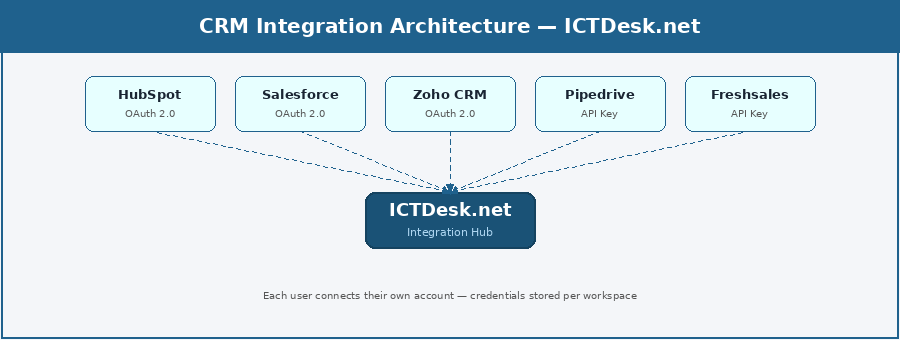
Supported CRM Platforms
| Platform | Connection | Key Actions | Best For |
|---|---|---|---|
| HubSpot | OAuth 2.0 | Keeps contacts in sync, logs each chat as an activity, and can open a deal or ticket on the spot | SMBs, marketing-led sales teams |
| Salesforce | OAuth 2.0 | Spins up leads, drops the transcript onto the record, raises cases, and can kick off a flow | Enterprise sales, large support teams |
| Zoho CRM | OAuth 2.0 | Syncs your contacts, captures new leads, nudges deal stages along, and files the transcript | SMBs using Zoho ecosystem |
| Pipedrive | API Key | Adds people and leads, pins activities to them, and moves cards through the pipeline | Sales-focused teams, deal tracking |
| Freshsales | API Key | New contacts land automatically, calls and chats get logged, deals stay current | Teams using Freshworks suite |
| Monday CRM | OAuth 2.0 | Turns chats into board items and tucks a short summary alongside each one | Visual workflow teams |
| Copper CRM | OAuth 2.0 | Built around Google Workspace; pulls chat contacts in without the fuss | Google-first businesses |
| Agile CRM | API Key | Creates the contact, tags it, and can set an automation running from there | Small teams, all-in-one stack |
| Bitrix24 | Webhook | Raises leads, keeps CRM records fresh, and fires off whatever workflow you've wired up | Teams using Bitrix24 collaboration |
| SuiteCRM | API Key | The open-source pick; adds contacts and keeps a record of every interaction | Self-hosted, data-sovereign teams |
What This Looks Like in Practice
Picture it. Someone opens a chat on an ICTDesk site and mentions their order number. By then the integration has already tied their email to a Salesforce contact, so the agent can see the full history, the deal attached to them, the case they raised last month. Two minutes later the issue's sorted, the chat logs itself, and the Salesforce record updates without anyone clicking into another screen.
That's not a polished demo. For any business that's connected its CRM, that's just a normal morning.
2. Helpdesk & Ticketing — From Conversation to Resolution
Chat and helpdesk software were always meant to go together. Chat is where the conversation kicks off; the helpdesk is where it lands when it can't be solved on the spot. What's always gummed up that handoff is the manual middle bit, copy-pasting the transcript, building the ticket by hand, dropping half the context along the way.
The helpdesk integrations get rid of that bit for good. A chat that needs escalating becomes a ticket with one click, or on its own if you've set a rule for it. The transcript, the customer's details, the metadata, all of it rides along. Your team never opens a blank ticket again.
For me, this is the line where a support setup stops being ad hoc. The day you can turn a live chat into a tracked, assigned, prioritised ticket without leaving the window, you've actually got a system.
Architecture
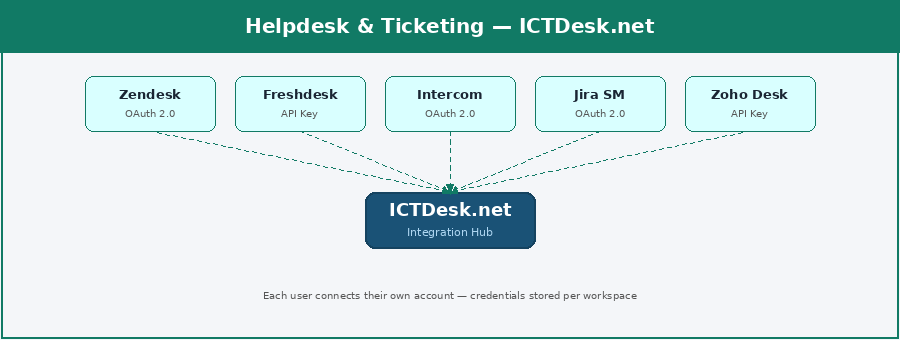
Supported Helpdesk Platforms
| Platform | Connection | Key Actions | Best For |
|---|---|---|---|
| Zendesk | OAuth 2.0 | Opens tickets, shifts their status, hands them to an agent, and pins the transcript as a note | Mid-to-enterprise support teams |
| Freshdesk | API Key | Raises and updates tickets, routes them to a group, and drops in a private note plus the transcript | Growing SMB support teams |
| Intercom | OAuth 2.0 | Starts conversations, tags the contact, reads back the history, and can trip a workflow | Product-led SaaS companies |
| Jira Service Mgmt | OAuth 2.0 | Files an issue, sets its priority, assigns it, and links it back to the right epic | Dev/tech teams, IT support |
| Zoho Desk | API Key | Creates the ticket, sends it to a department, keeps status current, and attaches the chat log | Zoho ecosystem users |
| HelpScout | OAuth 2.0 | Turns chats into conversations, tags the customer, and fires off a follow-up email | Email-first support teams |
| LiveAgent | API Key | Logs tickets, syncs the contact, and sets priority and tags as it goes | Teams wanting chat + ticketing |
| Kayako | API Key | Opens a case, keeps the conversation history up to date, and assigns the right agent | Unified support platforms |
| osTicket | API Key | The self-hosted option; creates tickets, sets the department, and saves the transcript | Self-hosted IT helpdesks |
| Groove | API Key | Starts a conversation, puts it with a team member, and lets you leave notes | Small teams, simple setup |
One pattern worth stealing: write a rule that spins up a Zendesk ticket the moment a chat gets flagged "unresolved" or runs past ten minutes. It arrives pre-filled with the transcript, the customer's email, and whatever category your bot worked out. What your Zendesk team opens is a proper, structured ticket, not a vague email that just says "please help."
3. E-Commerce — Turn Every Chat Into a Sales Opportunity
Run an online store and your chat widget is parked on prime real estate. Anyone who opens it is already leaning in, they're eyeing a product, stuck at checkout, or weighing a return. Calling that "support" undersells it. It's a sales conversation that hasn't happened yet.
The e-commerce integrations make sure your agents, and your bots, have what they need to actually close it. Order history, product specs, stock levels, discount codes, what's in the cart, all of it right inside the chat, no tab-hopping.
This one isn't only about better service. Wire chat into your store and conversion climbs, plainly. The people who chat tend to buy at several times the rate of those who don't.
Architecture
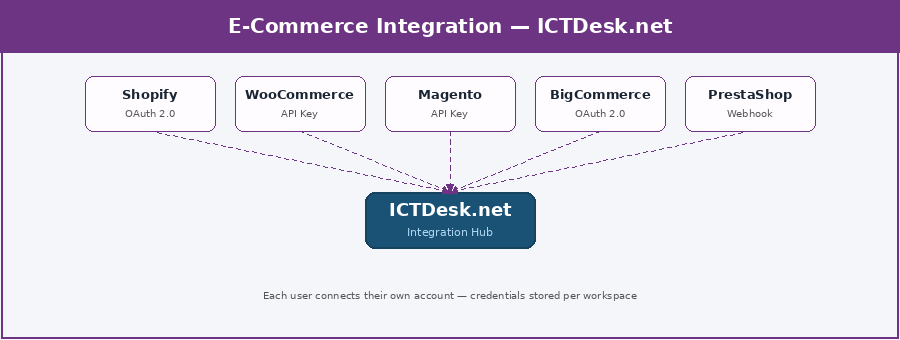
Supported E-Commerce Platforms
| Platform | Connection | Key Actions | Best For |
|---|---|---|---|
| Shopify | OAuth 2.0 (App) | Pulls up orders, checks what's in stock, applies a discount, even drafts an order mid-chat | DTC brands, retail stores |
| WooCommerce | API Key (REST) | Looks up an order, fetches the product details, confirms stock, and can mint a coupon | WordPress-based stores |
| Magento / Adobe Commerce | API Key | Queries orders and customers, handles returns, and reaches into the full catalogue | Enterprise e-commerce |
| BigCommerce | OAuth 2.0 | Finds the order, searches products, shows the customer profile, and applies a promo | B2B and B2C mixed stores |
| PrestaShop | Webhook + API | Surfaces order status, product info, and the customer's account details | European e-commerce stores |
| OpenCart | API Key | Looks up orders and products, and shows what the customer has bought before | Lightweight open-source stores |
| Wix eCommerce | OAuth 2.0 | Answers product questions, tracks the order, and pulls the customer profile | Small business storefronts |
| Ecwid | API Key | Bolts shop chat onto any site, with order and product lookup built in | Add-on stores, multi-site |
| CS-Cart | API Key | Handles orders and products across multiple vendors, right from the chat | Marketplace operators |
| Squarespace | OAuth 2.0 | Shows order status and product details, plus the basic customer info | Designer-focused brands |
Here's how it usually plays out. A Shopify store connects ICTDesk. A customer types "where's my order?" The integration finds their email in Shopify, pulls the order, sees it's in transit, and the bot fires back the tracking link on its own. If they follow up wanting to swap a product, the agent already has the order on screen and can draft the exchange without ever leaving the chat.
4. Messaging & Social Channels — Meet Customers Where They Already Are
Most businesses learn this one the hard way: customers don't bend to fit you, you bend to fit them. And in 2026 they're living on WhatsApp, Instagram, Telegram, and Messenger well before they think to type your web address.
The messaging integrations pull every one of those threads into a single inbox. WhatsApp messages, Instagram DMs, web chat, your agents work all of it from one screen with one set of tools, and the full context follows each person no matter where they first reached out.
"Omnichannel" has been said to death, but the expectation underneath it is real. If someone WhatsApped you yesterday, making them retell the whole story on your site today is just rude.
Architecture
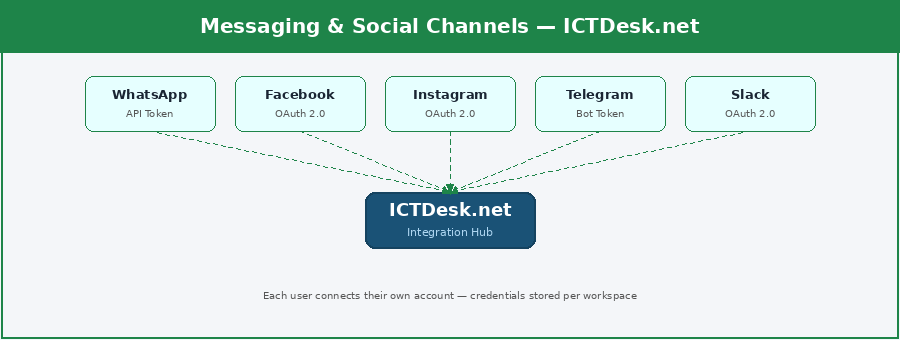
Supported Messaging Platforms
| Platform | Connection | Key Actions | Best For |
|---|---|---|---|
| WhatsApp Business API | API Token (Meta) | Send/receive messages, media, templates, manage sessions, status updates | Highest priority — 2B+ users |
| Facebook Messenger | OAuth 2.0 (Meta) | Send/receive messages, quick replies, persistent menus, referral tracking | Social commerce, lead gen |
| Instagram DMs | OAuth 2.0 (Meta) | Reply to DMs, story mentions, manage conversations across accounts | Brand engagement, retail |
| Telegram Bot API | Bot Token | Send/receive messages, commands, inline keyboards, group notifications | Tech communities, developers |
| Twilio SMS | API Key | Send/receive SMS globally, track delivery, manage two-way threads | Global SMS campaigns |
| Slack | OAuth 2.0 | Agent notifications, escalations sent to channels, ticket alerts | Internal team alerting |
| Microsoft Teams | OAuth 2.0 | Enterprise agent notifications, escalation routing, chat alerts | Enterprise internal comms |
| Viber | API Token | Send/receive messages, rich media, Eastern Europe & Middle East reach | Regional customer bases |
| Line | API Key | Japan, Thailand, Taiwan messaging, rich messages, chatbots | Asia-Pacific markets |
| API Key | China market messaging, official account integration, customer service | China market access |
WhatsApp earns its own paragraph here. With north of two billion users, it's far and away the integration ICTDesk customers ask for most. Connect your business account once and every WhatsApp conversation drops into the same inbox as your web chats. One team, one tool, nothing slipping through the cracks.
5. LLM & AI Integrations — Intelligence Inside Every Conversation
AI in customer support isn't on the horizon, it's already in the building. The businesses doing it well aren't firing their support teams; they're making those teams noticeably faster and steadier. That's the whole game.
The LLM integrations let each user plug their own AI API key straight into their workspace. From there the AI can suggest a reply as the customer types, boil a long thread down to a summary, work out what the person actually wants, translate on the fly, or just answer the routine stuff itself, all running on the model that user already trusts and pays for.
And that last part is deliberate. ICTDesk doesn't mark up your AI spend or pin you to one vendor. Bring your own OpenAI key, your own Claude key, your own Gemini key. The calls go out on your credentials, at cost, with nothing hidden in between.
The best AI here is the kind you hardly clock. It's quietly in the suggested reply, the sentiment it flagged, the language the bot reached for. It works the back so your agents can work the front.
Architecture
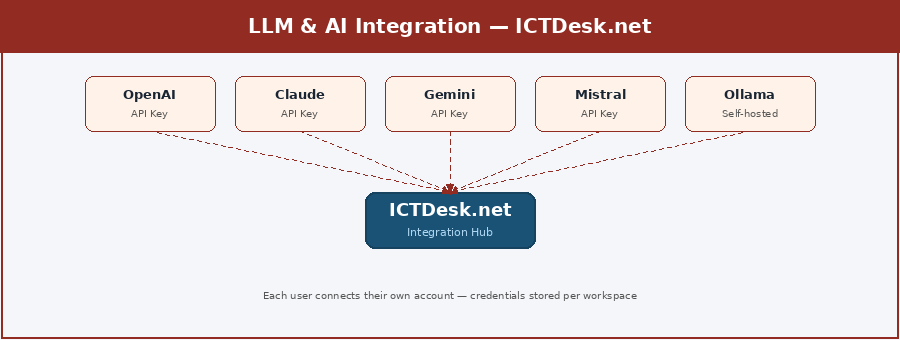
Supported LLM Providers
| Provider | Connection | Use Cases in ICTDesk | Best For |
|---|---|---|---|
| OpenAI (GPT-4o / GPT-5) | API Key (user’s own) | Smart replies, intent detection, chat summaries, FAQ auto-response, sentiment | General-purpose, widest use |
| Anthropic Claude | API Key (user’s own) | Safe customer replies, sensitive industry support, long context analysis | Healthcare, finance, compliance |
| Google Gemini | API Key (user’s own) | Real-time knowledge, multilingual support, Google-stack users | Multilingual, global teams |
| Microsoft Azure OpenAI | API Key (Azure) | Enterprise compliance, private deployment, M365 ecosystem | Enterprise data residency |
| Meta Llama 4 | Self-hosted (Ollama) | On-premise AI, full data sovereignty, custom fine-tuning | Privacy-first organisations |
| Mistral AI | API Key (user’s own) | Fast inference, GDPR-compliant European deployment | European businesses |
| DeepSeek | API Key (user’s own) | Cost-effective high-volume auto-responses, high throughput | High-volume chat automation |
| Groq API | API Key (user’s own) | Ultra-low latency replies — ideal for real-time chat suggestions | Speed-critical applications |
| Ollama (local) | Self-hosted endpoint | Run any model locally — zero data leaves the server | Maximum privacy control |
| Hugging Face Inference | API Key (user’s own) | Specialised models — sentiment, translation, classification | Custom ML pipelines |
What AI Does Inside an ICTDesk Chat
So what actually shifts the day you connect an LLM? A handful of things, and they add up:
- Smart reply suggestions: the AI follows the conversation and drafts a reply as the customer types. Your agent takes it, tweaks it, or waves it off. They stay in charge; the AI just rides shotgun.
- Auto-answers for the routine stuff: hours, pricing, the returns policy, anything the AI is confident about, it handles. The messy questions go to a person.
- Sentiment reading: it catches frustration or urgency as it happens and bumps that chat up the queue before it boils over.
- Summaries: long threads get condensed automatically, which is a gift when you're handing off between shifts or dropping notes into the CRM.
- Translation: a customer writes in their own language and gets answered in it. The agent sees the translation, the customer never notices the seam.
- Knowledge-base RAG: point it at your own docs, guides, and FAQs and it answers from those, not from some generic blob of training data.
6. MCP Integration — Your Live Chat Inside Every AI Assistant
If one thing here genuinely shifts the ground, it's this. Model Context Protocol, MCP for short, is an open standard Anthropic put out in late 2024 that OpenAI, Google, Microsoft, and most of the rest of the field have since picked up. By April 2026 there are more than 10,000 live MCP servers and SDK downloads running near 97 million a month.
So why does that matter for ICTDesk? Because we build one MCP server, hosted at mcp.ictdesk.net, and just like that every major AI assistant out there can talk to your live chat platform. Not just read from it, either, actually do things: start chats, search conversations, open tickets, pull analytics, all in plain language from inside Claude, ChatGPT, or Copilot.
Imagine sitting in Claude and typing "show me all the unresolved chats from today." It reaches into your ICTDesk workspace over MCP and hands back the list. "Create a ticket for the conversation with Ahmed about the billing issue." Done. You never opened a browser tab.
What MCP really does is change what ICTDesk is. It stops being a tool you log into and becomes a capability sitting inside the assistants your team already trusts. Build it once, and it's there everywhere.
Architecture
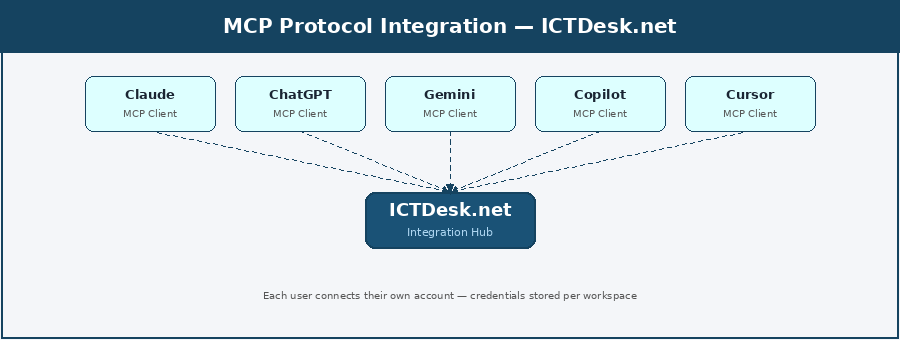
MCP-Compatible AI Clients
| AI Platform | MCP Role | What ICTDesk Users Can Do | Status |
|---|---|---|---|
| Claude (Anthropic) | MCP creator, full support | Read/write chats, create tickets, search conversations, get analytics via natural language | Full support — desktop + API |
| ChatGPT (OpenAI) | MCP client since March 2025 | Same capabilities as Claude — manage ICTDesk from ChatGPT interface | Tool-use interface |
| Google Gemini | MCP client | Live chat queries, ticket creation, contact management from Gemini | Supported via tool use |
| Microsoft Copilot | MCP client | ICTDesk actions inside M365, Teams, Word, Outlook context | Building MCP across M365 |
| Cursor IDE | Native MCP support | Developers access ICTDesk chat data while coding | Native, developer-focused |
| VS Code + Copilot | MCP via GitHub Copilot | Access ICTDesk within VS Code coding workflows | GitHub Copilot integration |
| Windsurf | Native MCP | AI code editor with full MCP client capability | Full MCP support |
| Claude Code | Native MCP | CLI-based access to ICTDesk for automation scripts and agentic workflows | Command-line, full support |
| Cline (VS Code) | Open-source MCP client | VS Code extension for ICTDesk access in development workflows | Open-source, growing |
| Continue.dev | MCP client | Open-source dev assistant with ICTDesk MCP access | Developer-focused |
What ICTDesk Exposes via MCP
| MCP Tool | Description | Auth Required |
|---|---|---|
| start_chat | Initiate a new live chat session for a visitor | User workspace token |
| send_message | Send a message to an active chat conversation | User workspace token |
| get_conversation | Fetch full transcript of a specific conversation | User workspace token |
| search_conversations | Search chats by keyword, date, agent, or status | User workspace token |
| close_conversation | Resolve and close an active chat | User workspace token |
| create_ticket | Convert a chat into a support ticket | User workspace token |
| get_visitor_info | Fetch visitor details, chat history, and contact record | User workspace token |
| get_agent_stats | Retrieve response times, chat volume, CSAT scores | User workspace token |
| set_auto_reply | Configure automated response for specific intents | Admin token |
| add_to_knowledge_base | Save an FAQ or answer to the AI knowledge base | Admin token |
In short, the MCP server hands any connected AI client the tools to manage conversations, open tickets, pull analytics, search transcripts, and assign agents, all driven by plain-language commands in whichever assistant you like.
Security lives at the workspace level. Each person authenticates the connection with their own ICTDesk bearer token, and anything that writes, sending a message, closing a chat, has to be confirmed in Claude or ChatGPT before it runs. No AI agent goes off and does something on its own.
7. Workflow Automation — ICTDesk Without Limits
Some workflows are just too particular to ship as a standard integration. Maybe a chat should spin up a Monday.com task. Maybe a fresh lead needs to land in Airtable. Maybe you want a WhatsApp message run through your own scoring logic before it's handed to an agent. Every business has a few of these.
That's what the automation integrations are for, Zapier, Make, n8n, and the rest. ICTDesk publishes a set of webhook triggers that fire on the events that matter, and those platforms grab the triggers and wire them into any of the thousands of apps they already speak to.
The thing people miss about the Zapier link is that it isn't one integration. It's a doorway to 7,000-plus apps, each of them reachable from your live chat through a single webhook.
Architecture
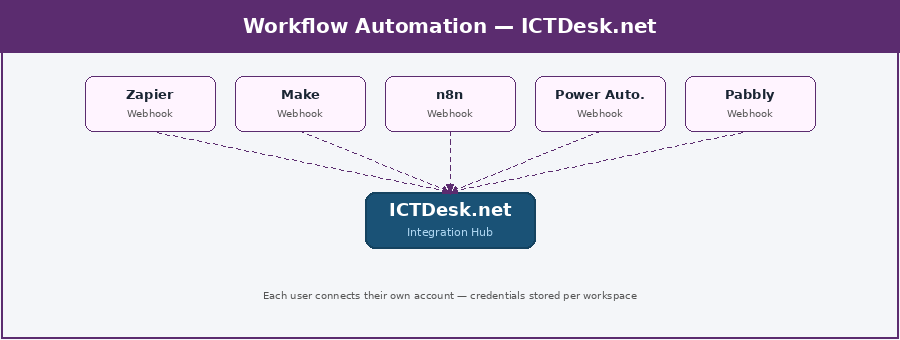
Supported Automation Platforms
| Platform | Connection | ICTDesk Triggers Available | Best For |
|---|---|---|---|
| Zapier | Webhook (per user) | Fires when a chat starts or ends, a message comes in, a lead's caught, or a ticket's raised | Non-technical users, 7,000+ apps |
| Make (Integromat) | Webhook (per user) | The same triggers, but with visual branching and data reshaping on top | Complex multi-step workflows |
| n8n | Webhook (per user) | Every trigger, plus a self-hosted option, custom code steps, and full control of your data | Technical teams, data sovereignty |
| Microsoft Power Automate | Webhook (per user) | Brings the triggers into M365 flows across Teams, SharePoint, and Dynamics | Microsoft 365 organisations |
| Pabbly Connect | Webhook (per user) | The core chat triggers at a flat rate, if budget's the main concern | Cost-sensitive SMBs |
| Activepieces | Webhook (per user) | An open-source option you can self-host, with a genuinely clean interface | Privacy-first teams |
| Relay.app | Webhook (per user) | Leans AI-native, handy for simple flows, meeting follow-ups, and routing leads | Non-technical AI adopters |
| Gumloop | Webhook (per user) | Wires an LLM into the flow so AI can chew through chat data as it moves | AI-first automation teams |
| Pipedream | Webhook (per user) | Serverless steps for developers, with the full run of Node.js or Python | Developer automation teams |
| Workato | Webhook (per user) | The enterprise end, with governance, compliance, and proper audit trails | Enterprise IT automation |
Something concrete: a user connects Zapier and builds a Zap that says, when a new ICTDesk chat gets tagged as a lead, create a HubSpot contact, drop them on a Mailchimp list, and ping the team in Slack. The whole chain lives in Zapier with ICTDesk as the trigger. No code, no developer, up and running inside twenty minutes.
8. Email Marketing — Chat Leads That Actually Get Followed Up
Few things on a website capture leads as well as live chat. Someone who bothers to open a chat is far warmer than someone who merely loaded a page. The nagging question has always been what happens to that lead once the conversation wraps up.
Without an email marketing hookup, the honest answer is "it depends whether the agent remembered to paste the email somewhere," which isn't a system at all. The email integrations turn every chat lead into a tagged, segmented contact in your marketing tool the second the chat ends, no remembering required.
Architecture
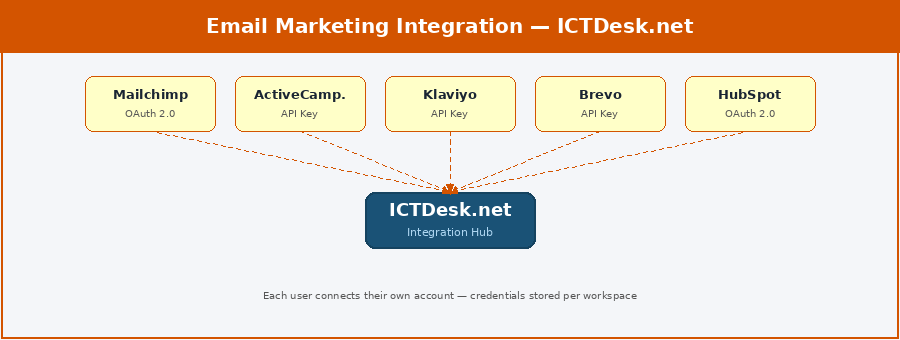
Supported Email Marketing Platforms
| Platform | Connection | Key Actions | Best For |
|---|---|---|---|
| Mailchimp | OAuth 2.0 | Adds or updates subscribers, tags them, sets automations running, and keeps lists tidy | SMBs, content-led marketing |
| ActiveCampaign | API Key | Creates the contact, starts a sequence, nudges deal stages, and applies tags | Advanced automation + CRM |
| Klaviyo | API Key | Syncs store customers, triggers flows, and segments people off the back of chat data | E-commerce email + SMS |
| Brevo (Sendinblue) | API Key | Adds contacts, sends transactional email, and looks after your lists | European teams, GDPR focus |
| HubSpot Email | OAuth 2.0 | Baked into HubSpot CRM, so chat leads slot straight into your marketing sequences | All-in-one HubSpot users |
| ConvertKit | API Key | Tags subscribers, drops them into sequences, and handles creator-style lists | Creators, course builders |
| Drip | API Key | Runs e-commerce email automations off the back of chat events | Shopify + email combo |
| Omnisend | API Key | Takes one chat lead and runs email, SMS, and push together as a sequence | E-commerce omnichannel |
| Moosend | API Key | Affordable automation that syncs subscribers straight from chat | Cost-sensitive SMBs |
| GetResponse | API Key | Manages subscribers and triggers off landing pages and webinar sign-ups | All-in-one marketing teams |
So when a visitor chats and leaves their email, ICTDesk can push them into Klaviyo, tag them as a chat lead, and kick off your welcome sequence, while the agent does nothing more than have the conversation. The integration takes care of the rest.
Integration Priority Roadmap
| Phase | Category | Platforms | Expected Impact |
|---|---|---|---|
| Phase 1 — Quick Wins | CRM + Helpdesk | HubSpot, Salesforce, Zendesk, Freshdesk | Immediate data sync, ticket auto-creation |
| Phase 1 — Quick Wins | E-Commerce | Shopify, WooCommerce | Order lookup in chat, conversion lift |
| Phase 2 — Reach | Messaging Channels | WhatsApp, Facebook, Instagram, Telegram | Omnichannel inbox, customer reach |
| Phase 2 — Reach | Email Marketing | Mailchimp, Klaviyo, ActiveCampaign | Automatic lead nurturing from chat |
| Phase 3 — Intelligence | LLM / AI | OpenAI, Claude, Gemini, Mistral | Smart replies, AI agents, auto-response |
| Phase 3 — Intelligence | MCP Protocol | Claude, ChatGPT, Copilot, Cursor | AI assistants control ICTDesk naturally |
| Phase 4 — Automation | Workflow Automation | Zapier, Make, n8n | Gateway to 7,000+ additional app connections |
| Phase 4 — Automation | Analytics | Google Analytics, Segment, Mixpanel | Data-driven optimisation, attribution |
Bringing It All Together
Pull back and every integration in this guide rests on one idea: your workspace is the centre, and the tools you already use connect into it securely, per user, on your credentials and your terms.
A business that hooks ICTDesk up to its CRM, its store, its WhatsApp, and its AI model isn't just running nicer live chat. It's built a joined-up customer operation where every conversation arrives informed, every lead gets caught, every ticket is tracked, and every agent has AI at their elbow.
Add MCP on top and those same conversations turn up inside the assistants your team lives in anyway, Claude, ChatGPT, Copilot, without anyone signing into yet another dashboard.
The way I'd put it: ICTDesk isn't just where the conversations land. It's where the whole operation knits together, and the integrations are what make that knitting possible.
A Final Word
Everyone who signs up is somewhere different on the path. Some are bolting live chat onto a website for the very first time. Others are already juggling a multi-agent desk across five channels in three languages.
So don't treat this guide as a checklist to tick off. Reach for an integration when the problem that needs it actually shows up. Start with whatever hurts most right now, usually CRM or helpdesk, and grow from there as the operation does.
What never changes is the principle underneath it all: each integration connects your account, your data, your tools, kept inside your workspace and run by your team. ICTDesk is the hub. You bring what matters.
And when you're ready to wire it together, we're around to help.
— The ICTDesk Team — ictdesk.net
ICTDesk is built and maintained by ICT Innovations — specialists in open-source communication platforms, VoIP, AI, and customer engagement software.
The ICTDesk Integration Team documents, tests, and maintains platform connections across CRM, helpdesk, e-commerce, AI, and automation tools. Part of ICT Innovations — the company behind ICTDesk’s open-source communication stack.
Ready to connect ICTDesk to your stack?
Free trial. No credit card. Connect your first integration in under 10 minutes.
Start Free Trial →